Introduction to FastAPI (Tutorial)
APIs
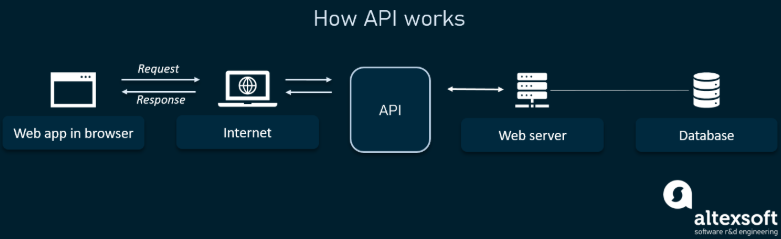
API stands for Application Programming Interface. It’s basically a way for one program to talk to another.
You can think of an API as a messenger: it takes your request, delivers it to another system, and brings back the response. This lets different software systems work together, even if they’re written in different languages or run on different platforms.
APIs make development faster and simpler because you don’t need to rebuild what already exists. For example, your app can use an existing API for payments, weather data, or maps instead of writing those features from scratch.
You can also think of APIs as contracts between two sides. If you send a request in the right format, the other side agrees to respond in a predictable way.

SOAP vs REST
There are many ways to design APIs, but two of the most common styles are SOAP and REST.
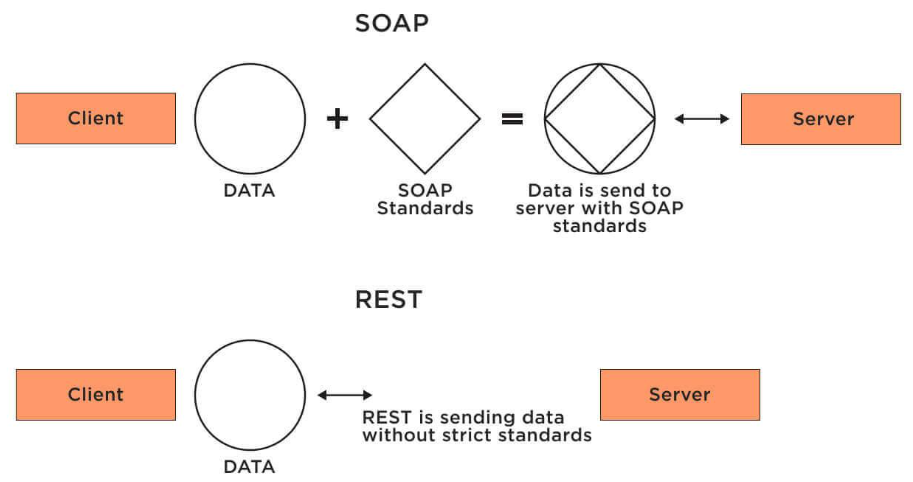
REST (REpresentational State Transfer) is the modern, lightweight style most web APIs use today. It relies on simple HTTP requests (like GET, POST, PUT, DELETE) to interact with data. Each URL, called an endpoint, represents a specific resource, for example, a list of users or a single student record.
A REST API typically sends and receives data in JSON format, which is easy to read and works naturally with most programming languages. REST is fast, easy to test, and scales well, which is why it’s used almost everywhere, from mobile apps to web servers.
SOAP (Simple Object Access Protocol) is an older, more rigid protocol that uses XML to exchange messages between systems. It’s common in large enterprise systems where strict standards, higher security, or formal contracts (like WSDL) are important. SOAP can run over different network protocols such as HTTP, SMTP, or FTP.
Here’s a quick comparison:
| # | SOAP | REST |
|---|---|---|
| 1 | An XML-based message protocol | An architectural style protocol |
| 2 | Uses WSDL for communication between consumer and provider | Uses XML or JSON to send and receive data |
| 3 | Invokes services by calling RPC method | Simply calls services via URL path |
| 4 | Does not return human readable result | Result is readable (plain XML or JSON) |
| 5 | Transfer is over HTTP. Also supports other protocols like SMTP, FTP, etc. | Transfer is over HTTP only |
| 6 | JavaScript can call SOAP, but it is difficult to implement | Easy to call from JavaScript |
| 7 | Performance is not great compared to REST | Performance is better — less CPU intensive, cleaner code |
FastAPI
FastAPI is a modern Python framework for building REST APIs.
It’s fast, simple, and built to take advantage of Python’s type hints to automatically validate data and generate documentation.
Key features
- Fast: High performance, comparable to Node.js and Go.
- Quick to build: You can develop features 2–3x faster.
- Fewer bugs: Automatic data checks catch many common mistakes.
- Intuitive: Excellent editor support and autocompletion.
- Easy to learn: Clean, minimal syntax that feels like plain Python.
- Robust: Produces production-ready code with built-in docs.
- Standards-based: Fully compatible with OpenAPI (Swagger) and JSON Schema.
Why it’s great
- It automatically validates your data.
- It automatically creates documentation for your API.
- It feels like writing normal Python code, but builds full APIs behind the scenes.
Let’s Begin
We will start by creating an empty folder and open it in VS Code.
We will open the terminal and create a virtual environment:
python -m venv venv
Then we will activate the environment:
.\venv\Scripts\activate
Then we will install fastapi and uvicorn
pip install fastapi uvicorn
Next we will create a file app.py that will be the entry to our API. We will import FastAPI from fastapi and initiate the app variable:
from fastapi import FastAPI

app = FastAPI()
Now we will create the end points to the app. To create an end point, we have to specifiy what the HTTP method this end point accepts, there are four different methods:
GETis for showing information to the user (from the server)POSTis for sending information to the server (creating information)PUTis for updating existing information on the serverDELETEis for deleting existing information on the server
Let’s begin by creating a simple home endpoint using GET
@app.get("/")
def home():
	return {"Status": "Server is running"}
Let’s run the app on hour local host server using uvicorn. To do that, we need to enter the following command:
uvicorn app:app --reload
the first app refers to the relative path to your python file, in our case it is app.py and we are in the same directory as this file. The second app is the initialization object of the FastAPI class (app = FastAPI()) and the parameter --reload allows the server to auto refresh whenever we modify our files, otherwise we will have to stop the server and run it again after each modificaiton.
A link will be provided to you in the terminal which is where the app is running, e.g. http://127.0.0.1:8000, click on it and you will see:
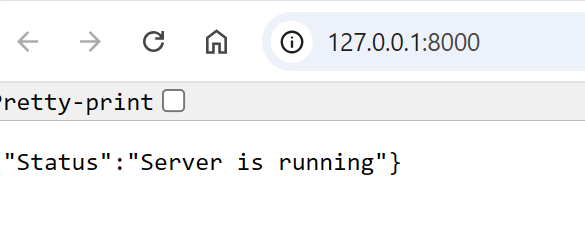
Great! our GET endpoint works just fine!
Docs
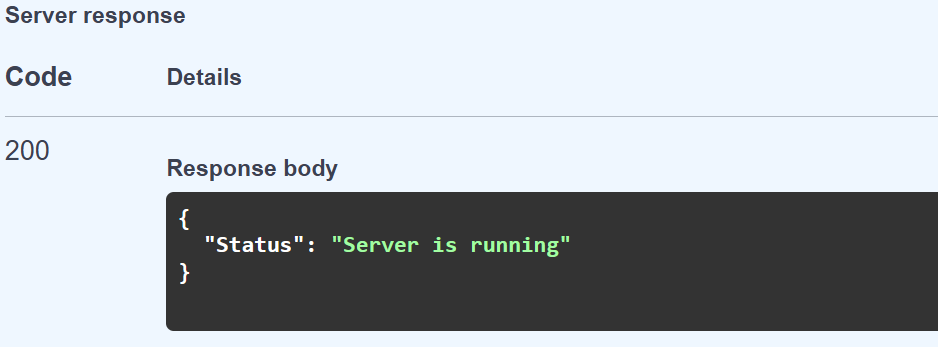
If you attach /docs to the url, you will see the auto documentation of your service (endpoints) provided to you from FastAPI. There you can try out the different endpoints you developed. For now, we will only see our home endpoint:
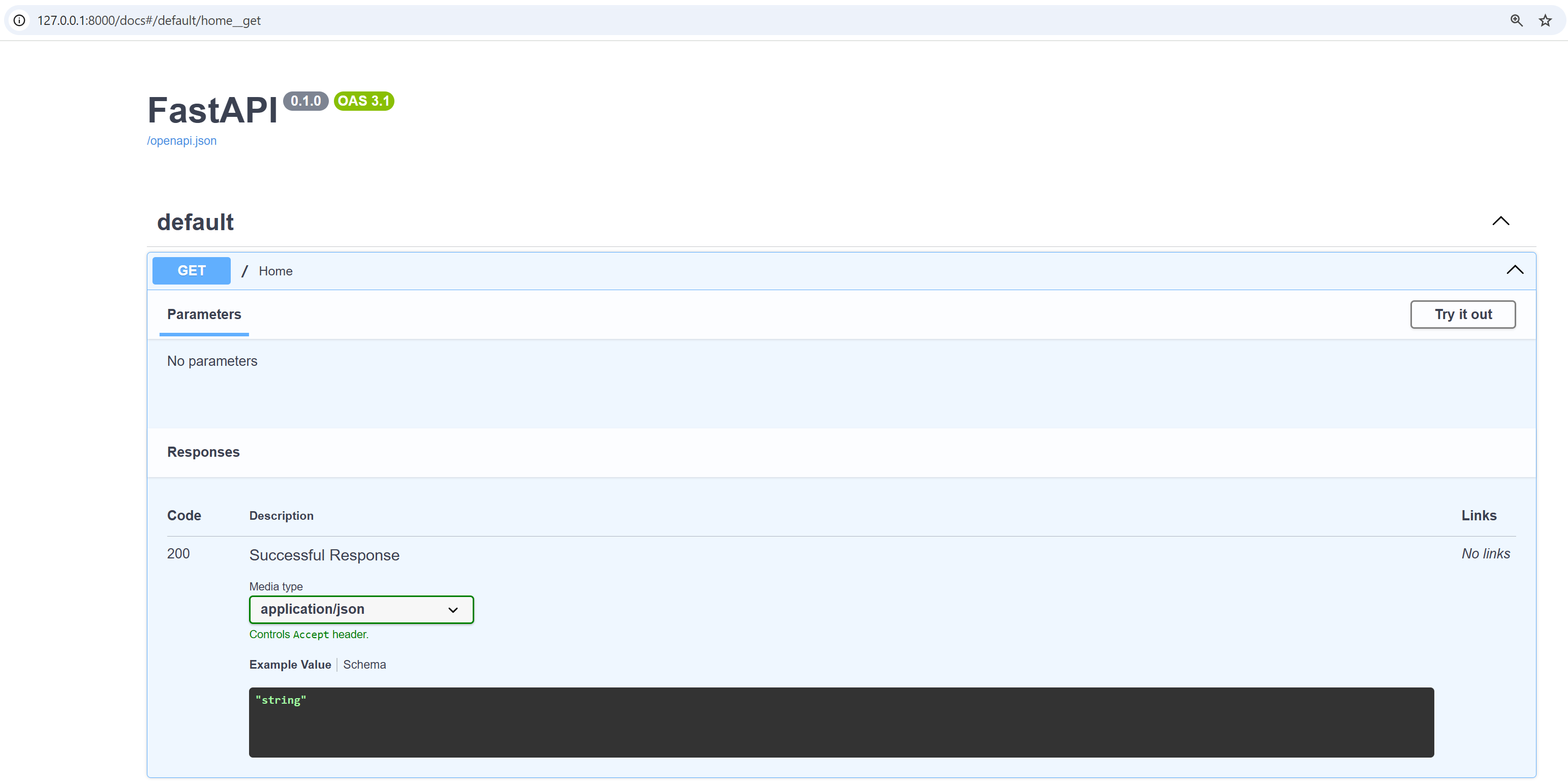
Click on Try it out and then Execute, you will see the output from that endpoint (the HTTP response body):
Endpoint Parameters
Lets assume that we have inventory data about students in JSON format, and we want a GET endpoint, e.g. get-student that takes a student id and give us the details about that student, we can do that by the following:
students = {
    1: {
        "name": "Ibrahim Nasser",
        "Age": 24,
        "Program": "B.Eng. Software Engineering"
    }
}

@app.get("/")
def home():
    return {"Status": "Server is running"}

@app.get("/get-student/{std_id}")
def get_student(std_id: int):
    return students[std_id]
Let’s go to docs and test that!

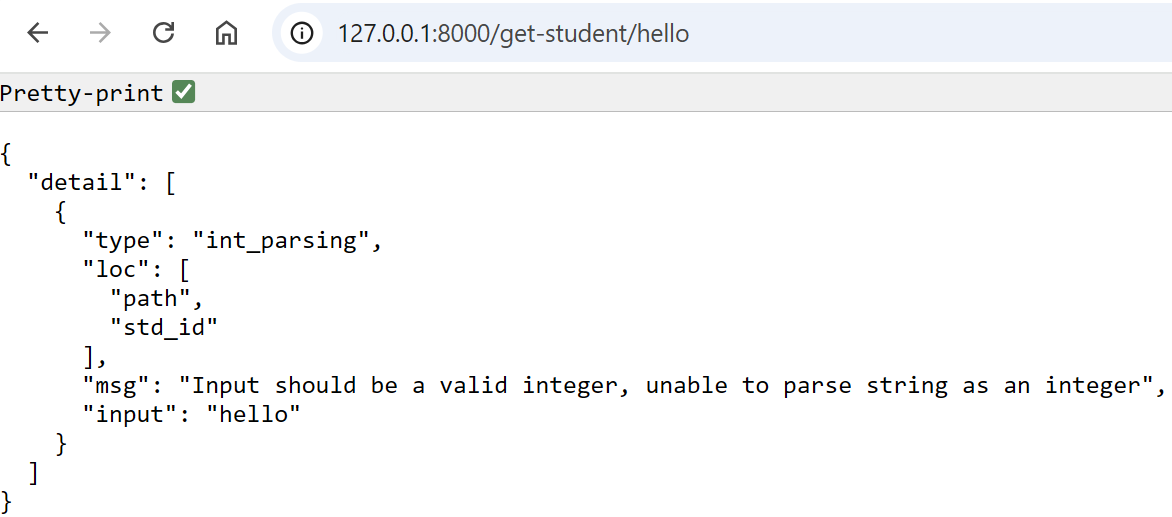
Note that passing an id that does not exist would return Internal Server Error. Try that yourself! You can also test the endpoint using the url:

Moreover, FastAPI provides us auto validation if we provide type hints, because we specified std_int:int if a non integer value was passed we get this structured response (i.e. we do not need to hard code the type checking):
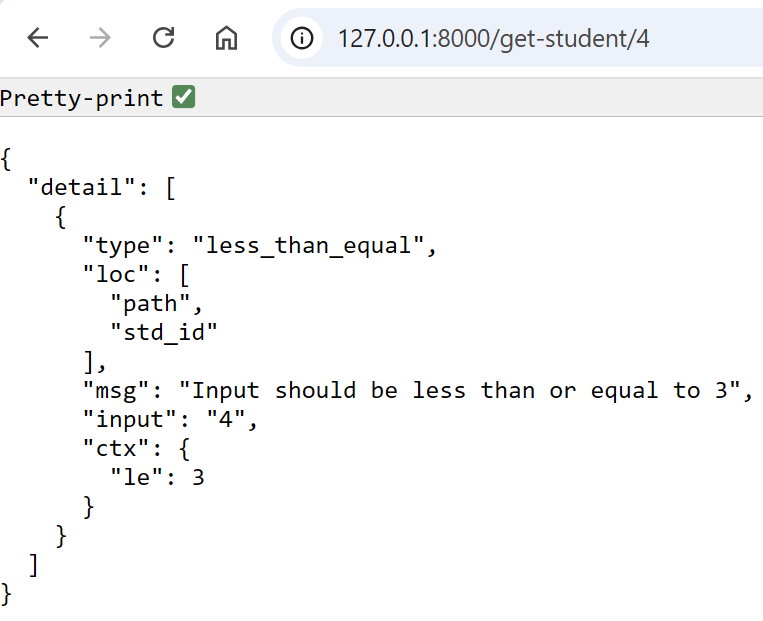
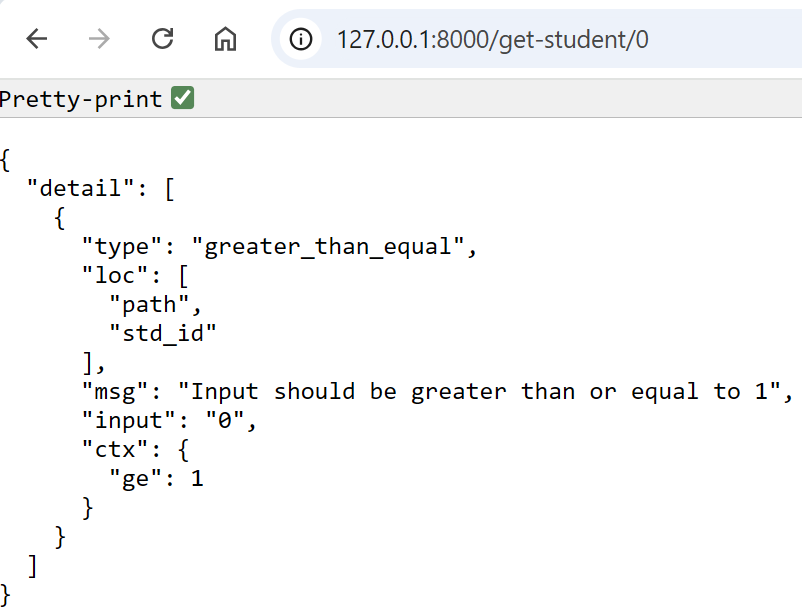
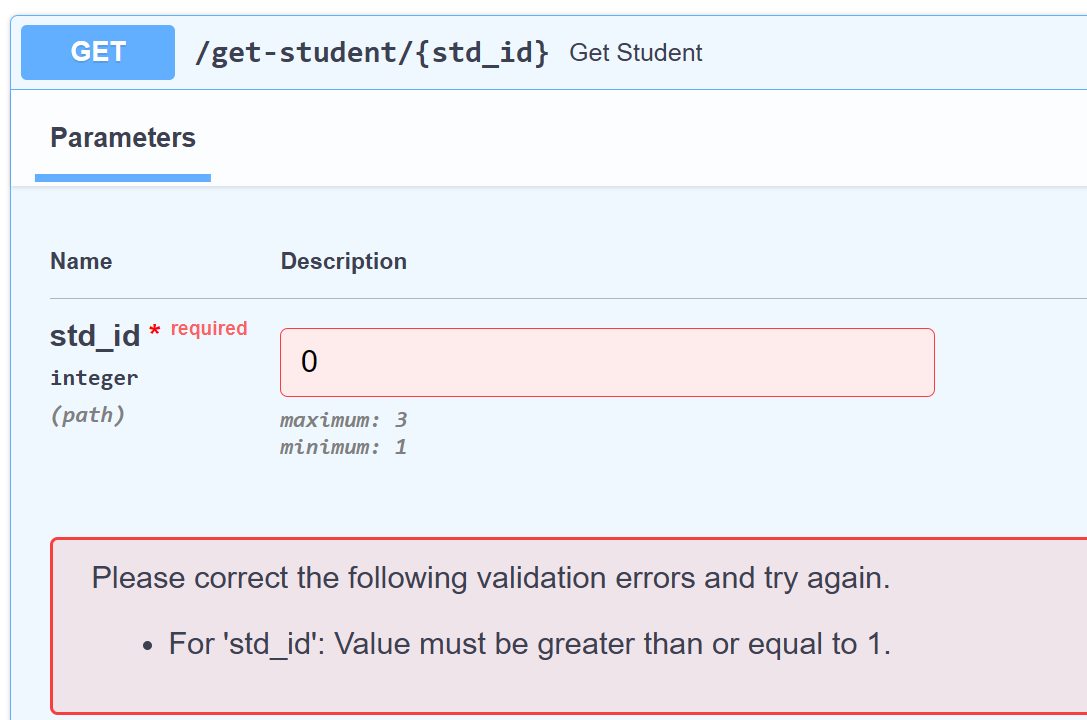
Autovalidation is about more than just types, Using the Path from fastapi and Annotated from typing package we can constraint the parameter as we want and FastAPI takes care of validation. For example, consider we have total of three students with ids 1,2,3 then we can constraint that the input must be greater than or equal to 1 and less than or equal, otherwise we will get structured response about the violation of those constraints:
from fastapi import FastAPI, Path
from typing import Annotated

app = FastAPI()

students = {
    1: {
        "name": "Ibrahim Nasser",
        "Age": 21,
        "Program": "B.Eng. Software Engineering"
    },
    2: {
        "name": "John Doe",
        "Age": 22,
        "Program": "B.Sc. Computer Science"
    },
    3: {
        "name": "Ali Karma",
        "Age": 19,
        "Program": "B.Eng. Mechatronics Engineering"
    },
}

@app.get("/")
def home():
    return {"Status": "Server is running"}

@app.get("/get-student/{std_id}")
def get_student(std_id: Annotated[int, Path(title="Student ID", ge=1, le=3)]):
    return students[std_id]
Query Parameter
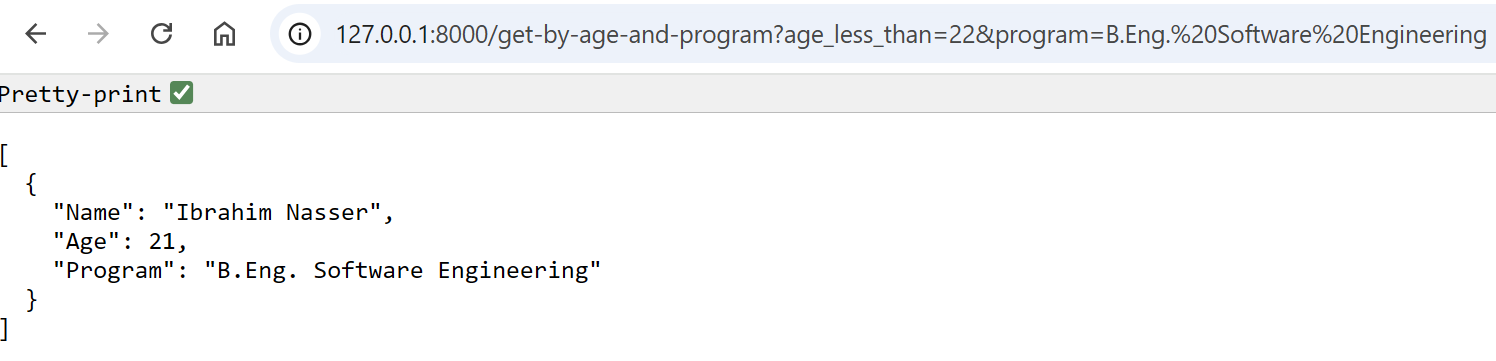
A query is what we append to a url after ? followed by & for more than one parameter. For example, we want to give the endpoint age, and program and we want back students that are younger than that age and study that program:
from fastapi import FastAPI, Path
from typing import Annotated

app = FastAPI()

students = {
    1: {
        "Name": "Ibrahim Nasser",
        "Age": 21,
        "Program": "B.Eng. Software Engineering"
    },
    2: {
        "Name": "John Doe",
        "Age": 22,
        "Program": "B.Sc. Computer Science"
    },
    3: {
        "Name": "Ali Karma",
        "Age": 19,
        "Program": "B.Eng. Mechatronics Engineering"
    },
}

@app.get("/")
def home():
    return {"Status": "Server is running"}

@app.get("/get-student/{std_id}")
def get_student(std_id: Annotated[int, Path(title="Student ID", ge=1, le=3)]):
    return students[std_id]

@app.get("/get-by-age-and-program")
def get_student(age_less_than: int, program: str):
    res = []
    for std_id in students:
        if students[std_id]["Age"] < age_less_than and students[std_id]["Program"] == program:
            res.append(students[std_id])
    return res
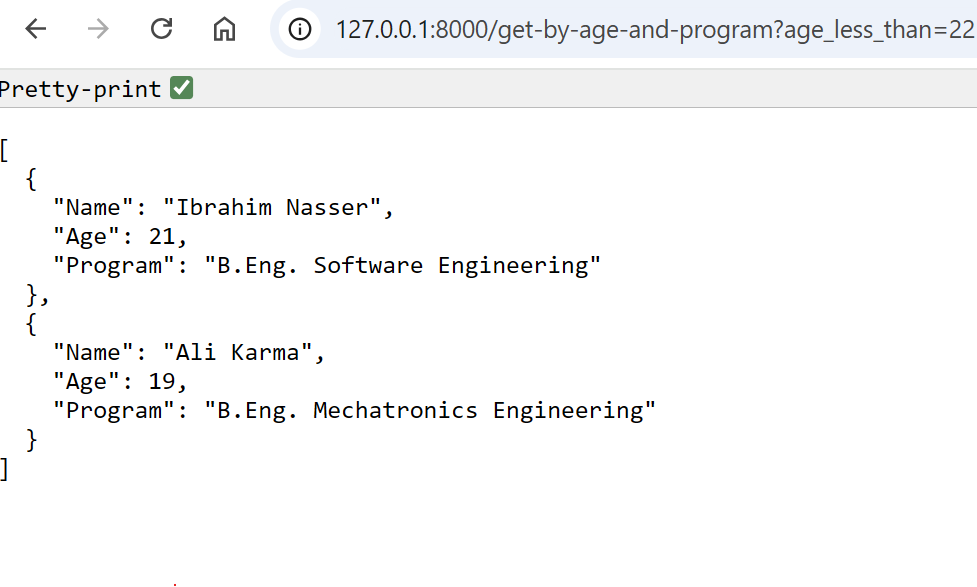
If we allow some flexibility (either one parameter or both), we an use Optional package from typing, for example, we want to accept only age, and optionally the program:
from typing import Optional

@app.get("/get-by-age-and-program")
def get_student(age_less_than: int, program: Optional[str] = None):
    res = []
    for std_id in students:
        if students[std_id]["Age"] < age_less_than:
            res.append(students[std_id])

    if program:
        filtered = []
        for s in res:
            if s["Program"] == program:
                filtered.append(s)
        res = filtered

    return res
Request Body
Let’s now see POST examples. When we try to add information to the database query parameters do not make sense anymore. A bunch of information can be sent to the server via HTTP POST request, and those bunch of information are called request body.
We will use BaseModel from pydantic to create a sort-of template (class) for the information we will send. We do so by creating a class, e.g. Student that inherits from BaseModel.
from pydantic import BaseModel
from typing import Optional

class Student(BaseModel):
    name: str
    age: int
    program: str
    cgpa: Optional[float] = None
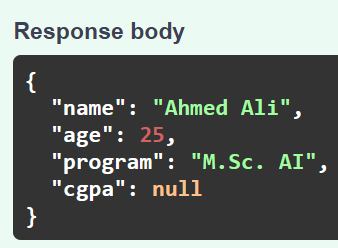
Let’s create a POST endpoint that creates a student and return it as a response.
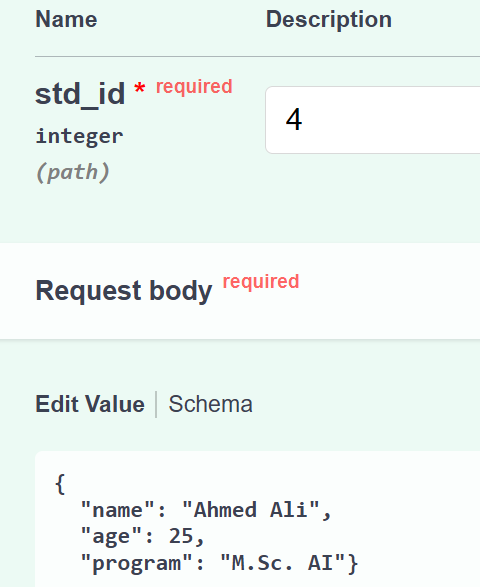
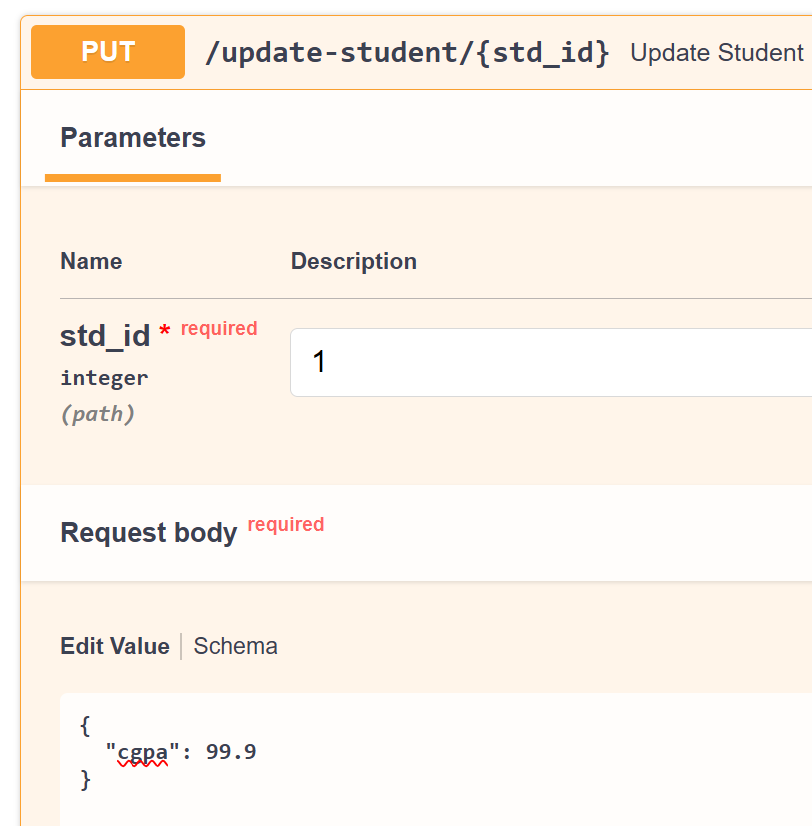
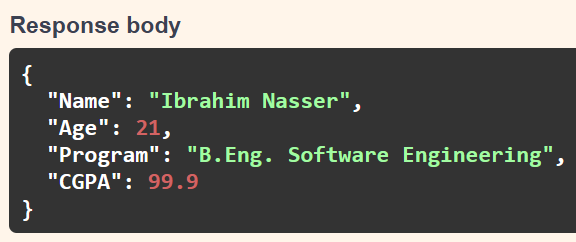
Let’s do one to update a student info (will be a PUT request):
from pydantic import BaseModel
from typing import Optional

class UpdateStudent(BaseModel):
    name: Optional[str] = None
    age: Optional[int] = None
    program: Optional[str] = None
    cgpa: Optional[float] = None

@app.put("/update-student/{std_id}")
def update_student(std_id: int, student: UpdateStudent):
    if std_id not in students:
        return {"Error": "ID not found"}

    if student.name is not None:
        students[std_id]["Name"] = student.name

    if student.age is not None:
        students[std_id]["Age"] = student.age

    if student.program is not None:
        students[std_id]["Program"] = student.program

    if student.cgpa is not None:
        students[std_id]["CGPA"] = student.cgpa

    return students[std_id]
And finally, a DELETE request example:
from fastapi import Query

@app.delete("/delete-student")
def delete_student(std_id: int = Query(..., description="The ID of the student you want to delete")):
    if std_id not in students:
        return {"Error": "ID not found"}
    del students[std_id]
    return {"Success": "Student Deleted"}
you try that endpoint yourself from the docs!
HTTP Status
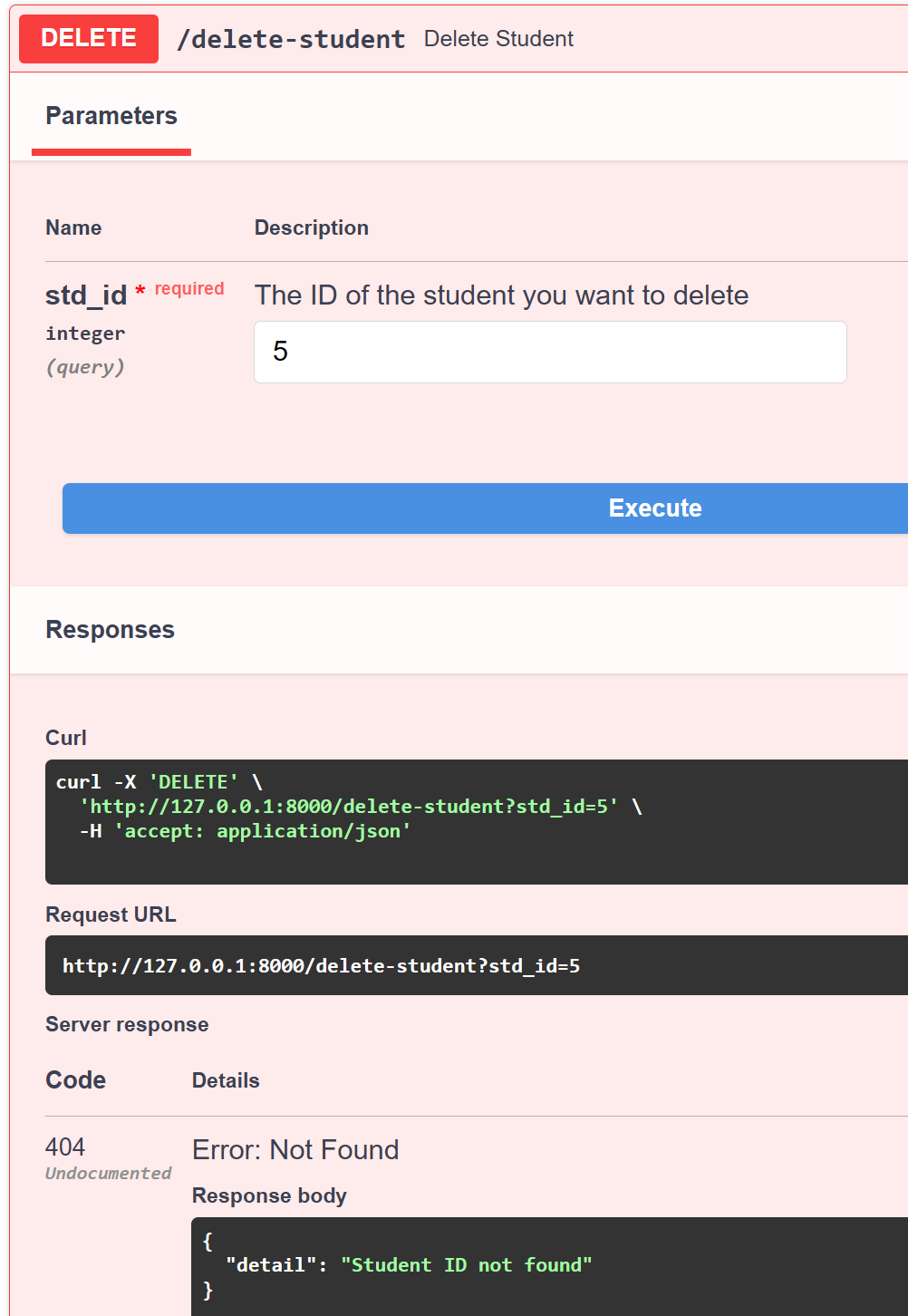
We can, instead of returning explicitly return {"Error": "ID not found"}, raise an HTTPException with a status from fastapi. For example:
from fastapi import FastAPI, Path, Query, HTTPException, status

@app.delete("/delete-student")
def delete_student(std_id: int = Query(..., description="The ID of the student you want to delete")):
    if std_id not in students:
        raise HTTPException(
            status_code=status.HTTP_404_NOT_FOUND,
            detail="Student ID not found"
        )
    del students[std_id]
    return {"Success": "Student Deleted"}
Database
All the creation, update, deletion process we programmed lives in the random memory (RAM) through the python dictionary students. If we want persistent operations we need to use a database. One way of doing this is to use SQLite with SQLModel. It works smoothly with FastAPI and gives us pydantic validation.
First, we install SQLModel:
pip install sqlmodel
Then we rewrite all our endpoints as before, the only change is the database connection. Here is the full app.py:
from typing import Optional, Annotated, List
from fastapi import FastAPI, Path, Query, HTTPException, status, Depends
from sqlmodel import SQLModel, Field, Session, create_engine, select

app = FastAPI()

# 1) DB model
class Student(SQLModel, table=True):
    id: int = Field(primary_key=True, index=True)
    name: str
    age: int
    program: str
    cgpa: Optional[float] = None

# 2) Request models if you want distinct payloads
class CreateStudent(SQLModel):
    name: str
    age: int
    program: str
    cgpa: Optional[float] = None

class UpdateStudent(SQLModel):
    name: Optional[str] = None
    age: Optional[int] = None
    program: Optional[str] = None
    cgpa: Optional[float] = None

# 3) Engine and session dependency
DATABASE_URL = "sqlite:///students.db"
engine = create_engine(DATABASE_URL, echo=False)

def get_session():
    with Session(engine) as session:
        yield session

@app.on_event("startup")
def on_startup():
    SQLModel.metadata.create_all(engine)
    # Seed once if empty to mirror your initial data
    with Session(engine) as session:
        count = session.exec(select(Student)).first()
        if count is None:
            session.add_all([
                Student(id=1, name="Ibrahim Nasser", age=21, program="B.Eng. Software Engineering"),
                Student(id=2, name="John Doe", age=22, program="B.Sc. Computer Science"),
                Student(id=3, name="Ali Karma", age=19, program="B.Eng. Mechatronics Engineering"),
            ])
            session.commit()

@app.get("/")
def home():
    return {"Status": "Server is running"}

@app.get("/get-student/{std_id}")
def get_student(
    std_id: Annotated[int, Path(title="Student ID", ge=1)],
    session: Session = Depends(get_session)
):
    student = session.get(Student, std_id)
    if not student:
        raise HTTPException(status_code=404, detail="Student not found")
    return student

@app.get("/get-by-age-and-program", response_model=List[Student])
def get_by_age_and_program(
    age_less_than: int,
    program: str,
    session: Session = Depends(get_session)
):
    stmt = select(Student).where(Student.age < age_less_than, Student.program == program)
    return session.exec(stmt).all()

@app.get("/get-by-age-and-optionally-program", response_model=List[Student])
def get_by_age_and_optionally_program(
    age_less_than: int,
    program: Optional[str] = None,
    session: Session = Depends(get_session)
):
    stmt = select(Student).where(Student.age < age_less_than)
    rows = session.exec(stmt).all()
    if program:
        rows = [s for s in rows if s.program == program]
    return rows

@app.post("/create-student/{std_id}")
def create_student(
    std_id: int,
    body: CreateStudent,
    session: Session = Depends(get_session)
):
    if session.get(Student, std_id):
        raise HTTPException(status_code=400, detail="Student ID already exists")
    student = Student(id=std_id, **body.dict())
    session.add(student)
    session.commit()
    session.refresh(student)
    return student

@app.put("/update-student/{std_id}")
def update_student(
    std_id: int,
    body: UpdateStudent,
    session: Session = Depends(get_session)
):
    student = session.get(Student, std_id)
    if not student:
        raise HTTPException(status_code=404, detail="ID not found")
    data = body.dict(exclude_unset=True)
    for k, v in data.items():
        setattr(student, k, v)
    session.add(student)
    session.commit()
    session.refresh(student)
    return student

@app.delete("/delete-student")
def delete_student(
    std_id: int = Query(..., description="The ID of the student you want to delete"),
    session: Session = Depends(get_session)
):
    student = session.get(Student, std_id)
    if not student:
        raise HTTPException(status_code=status.HTTP_404_NOT_FOUND, detail="Student ID not found")
    session.delete(student)
    session.commit()
    return {"Success": "Student Deleted"}
Give it a run uvicorn app:app --reload!
Conclusion
In this tutorial, you learned what APIs are, how REST compares to SOAP, and how to build and test your own REST API using FastAPI.
You saw how simple it is to define endpoints, handle parameters, validate data, and even connect to a real database.
FastAPI is powerful yet beginner friendly. It gives you automatic validation, type safety, and interactive documentation out of the box so you can focus on building features, not boilerplate.
If you want to dive deeper, check out the official documentation. It is one of the best written docs in the Python ecosystem and covers everything from authentication to async performance tuning.
Keep experimenting, break things, and rebuild. That is the fastest way to master FastAPI.